
VyprVPN is one of the most well-known names in Internet privacy. They have a large network that spans 64 nations, with more than 700+ servers available. That network offers users more than 200,000+ different IP addresses to choose from. Their server clusters and DNS servers are entirely in house, eliminating any issues with third-party providers. In addition to all three of the popular VPN protocols, they offer their own, Chameleon, which prevents deep packet inspection and allows you to avoid throttles and blocks on encrypted traffic.
VyprVPN was developed by Golden Frog, a corporate partner with the well-known and highly respected Usenet company Giganews. Golden Frog respects user privacy and is committed to an open and free Internet. You can read more about the company’s background here.
Currently VPNReviewz has a special deal with VyprVPN for just $5.00 / month when you sign up with our link.
Pricing & Plans
VyprVPN has a 30-day money-back guarantee and payment options are either Paypal or Credit Card.
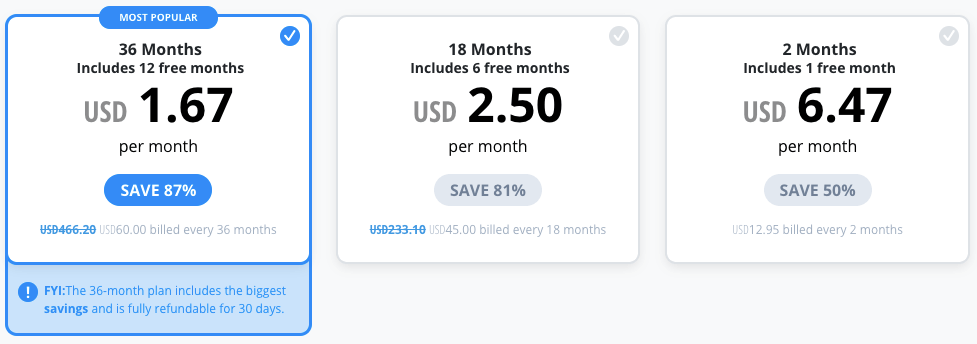
All plans include:
- WireGuard Advanced Protocol
- No-Log VPN
- Apps for all your devices
- End-to-end Privacy with No 3rd Parties
- 70+ Fast, Global Server Locations
Free Trial/ Money-back Guarantee
VyprVPN offers a 30-day money-back guarantee.
Privacy & Anonymity
VyprVPN has some innovative ways to keep your browsing data private. They use their own DNS servers—VyprDNS—which are owned and operated by the company exclusively for their customer’s usage. This service is included with every plan.
Logging Policy
The logging vs. no logging issue is a passionate one for many people and VyprVPN is no stranger to this. They have decided that increased performance, reliability and ability to prevent abuse are worth minimal logging and they are transparent about it.
Golden Frog logs the following information and only retains it for 30 days:
- Customer’s source IP address (generally the IP address assigned by the customer’s ISP)
- VyprVPN IP address used by the users
- Connection start and stop time
- Total number of bytes used
They do NOT log:
- The content of your communications
- The websites that you visit
- The services that you use
- Your physical location
- Any other personal information
In their view, the purpose of a VPN is to greatly increase privacy and security but does not guarantee anonymity. Note this applies especially for purposes of committing crimes, hacking, etc.
Torrent Policy
There are no restrictions on using torrents over VyprVPN. If you do plan on torrenting, however, it’s always advisable to connect to a server located outside your home nation. With over 700+ servers to choose from, this is a non-issue with VyprVPN.
Customer Support
GoldenFrog, the parent company, offers support for their products around the clock and they update and improve their desktop and mobile apps on a regular basis. You can access support directly from their app.
Product Testing
VyprVPN comes with a desktop and mobile client option which are very easy to use and has a simple interface. Install the application and easily connect to the server of your choice.
VyprVPN also has desktop apps that work with Windows and Mac. The mobile app supports iOS and Android.
Windows, Mac, iOS and Android VyprVPN apps are compatible with WireGuard.
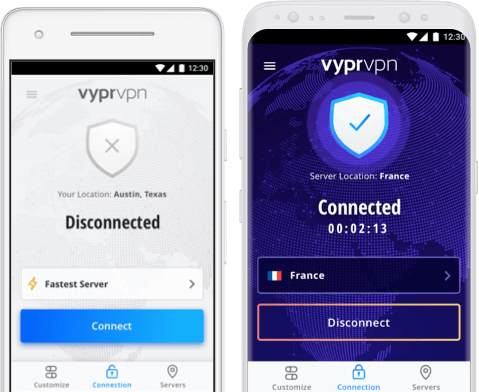
All VyprVPN users have access to mobile apps for both iOS and Android that make it easy to secure your mobile browsing. Here are a few highlights that both apps share:
- Connect with a single tap(after unlocking your screen on Android) and on iOS setup to automatically connect
- Auto-select the fastest server based on your location
- Change protocols quickly and easily
- Encrypt your web browsing, email and apps
- Encrypted DNS called VyprDNS to prevent DNS leaks and ISP snooping
Each app also has unique features:
- VyprVPN on Demand for iOS detects when your iPhone or iPad initiates an Internet connection and automatically connects to VyprVPN.
- With VyprVPN for Android you use VyprVPN widgets to connect or disconnect from your home or lock screen. You can also view your server location, throughput and IP address.
Both apps are currently available in Apple’s AppStore and the Google Play Marketplace.
VPN Server Locations
VyprVPN has a large network clustered in North America, South America, Europe, Asia, Africa and Oceania that spans 70 nations. With more than 700+ VPN servers available, VyprVPN offers users more than 300,000+ different IP addresses to choose from.
Countries Supported:


Speed Test

Pictured on top is a baseline speed test over a 50Mbps download/5Mbps upload connection from Albuquerque, NM to Washington DC. Below is the same connection running through VyprVPN’s servers.

The download times in this test showed just under 14Mbps in speed reduction; hardly noticeable as a percentage reduction in speed. The upload speeds were barely affected at all. Ping time increases would not be noticeable unless that figure was particularly important, such as in FPS gaming.
Your results will vary, but the connection speeds over VyprVPN on our lines were very fast.
IPCheck and DNSLeak Test
VyprVPN’s IP check resolved exactly to what their client showed. There were no DNS leaks with Windows setup to get the DNS address automatically. The VyprDNS was seamless and all DNS servers reported back as theirs.
Feature Summary
- More than 700+ servers in 64 nations with 200,000+ IPs
- PPTP, L2TP/IPSec, OpenVPN and Chameleon
- 128- and 256-bit encryption
- Windows, Mac, Linux, Android and iOS apps
- Unlimited bandwidth
- Unlimited speed
- NAT Firewall protection
- No third-party servers
- VyprDNS
- 24-hour support
- 3-day free trial
- Kill switch on client
Additional Bonus Features
In addition to the easy config desktop and mobile apps VyprVPN offers the following bonus features.
- VyprDNS – VyprDNS is an encrypted DNS service that prevents ISP snooping, DNS leaks and man in middle attacks.
- Chameleon VPN Protocol – a proprietary VPN protocol which helps VPN users disguise the nature of their traffic. Note: VPN traffic is always encrypted however due to the nature of the VPN connection process, ISPs can see that you are sending encrypted VPN data and shut down the connection. This happens in China often and the Chameleon protocol helps to prevent this type of monitoring – more detail on the Chameleon VPN protocol here.
- VyprVPN Cloud – a user-friendly VPN server deployment solution that gives you an added layer of security whenever you’re accessing your cloud servers. This is offered for DigitalOcean, Amazon Web Services, and VirtualBox.
- Public Wi-Fi Protection – ensures that your connection is secure and you stay protected from hackers and snoops even when accessing unknown Wi-Fi networks
We Liked
- Very stable client on all platforms
- Excellent speeds
- Unlimited bandwidth
- Chameleon protocol
Areas for Improvement
The logging policy might put some users off, but VyprVPN is very transparent about it.
Conclusion
VyprVPN is an outstanding provider. Their networks are fast, their software is always improved upon and their reputation is rock solid. This is a highly-recommended service for business and personal users. The Internet kill switch and Chameleon protocol really make them outstanding in terms of valuable extras.


I tried Vyper, and on based on similar recommendations to this purchased their one-year VPN term – worst decision I ever made!
Based on their Hong Kong servers, my experience was terrible: incredibly slow speeds (Ping 96ms; Download 0.90mbps; and upload stalled out without any results) at the same time, without VPN service I was getting Ping 57ms; Download 3.9mbps; Upload 3.91mbps.
Resolutions were difficult as their “connect” icon’s customer service would not work; I emailed them directly and finally got a reply the next day; half a dozen emails later, and conflicting advice from their techs left me with the best option – UNINSTAll!
I then switched over to ExpressVPN, set it up easily and have had no speed, or connecting issues.
I also use Witopia, on an older laptop, while it’s satisfactory it does not always give consistent service; but it’s good enough for a backup; which I wouldn’t even use Vyper for.
The speed test screen shots fail to mention which encryption protocol is in use. I have had results similar to yours using the simplest PPTP 128 bit protocol. The complex 256 bit chameleon protocol slows my un-encrypted 40 Mbps connection down to around 10 Mbps on the fastest servers available. Still usable for a single connection but might be problem for multiple streams or multiple devices behind a router. Your mileage may vary.